
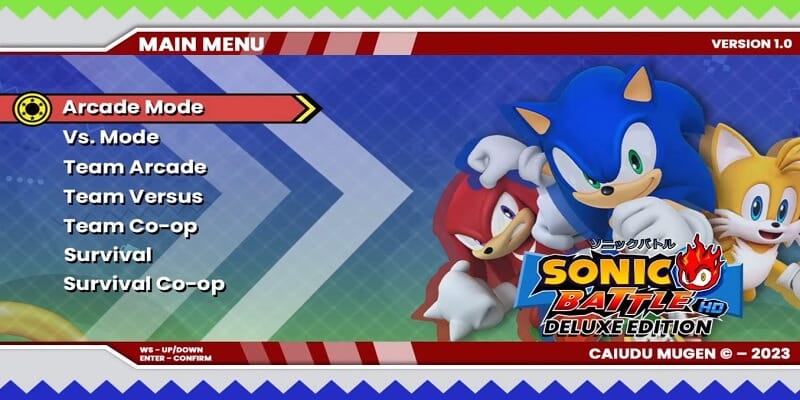
Download Sonic Battle HD Deluxe Edition Mugen, a fun fangame developed with the free Mugen 2D video game engine, featuring different game modes such as single player, two-player versus modes, team battles, AI-only battles, customization options, and more.
You can try playing it on other platforms, such as Android phones, with emulators like ExaGear or Winlator. We have tutorials for that on our YouTube channels or right here in the tutorials section of the menu.
Follow us on our social media so you don't miss out on upcoming games, tutorials, updates, and more.
Game Information:
Platform:
PCAuthor:
CAIUDUCompressed:
5.44 GBUnzipped:
8.64 GBStorage:
14.08 GBRendermode:
OpenGLLinks download:
Instructions:
Playing Instructions:
(Open) If the game has only one part:
- Have WINRAR installed, the free trial works and is downloaded from the official website.
- Then right click on the game file.
- Look in the menu for the WINRAR icon or section and select the "Extract to" or "Extract here" option.
- Wait for the game to finish extracting.
- The folder with the game files will be created.
- Open the folder and run the icon with .exe extension can have the Mugen icon or the name of the game.
(Open) If you have several parts:
- Download all the complete parts and have them together in the same folder, if any part is missing the game may not work.
- Have WINRAR installed, the free trial works and is downloaded from the official website.
- Right click on part number 1 and then look for the WINRAR icon or section in the menu and select the "Extract to" or "Extract here" option.
- It will start extracting that part of the game and usually continue automatically with the other parts until all parts are finished.
- If it does not continue automatically with the other parts, you must extract each part of the game separately and make sure that all the extracted files are saved inside the same folder, if they are extracted in separate folders, you must put them all together inside a single folder
- Open the folder and run the icon with .exe extension may have the Mugen icon or the name of the game.
(Open) If you are going to apply a Patch:
- Download the patch.
- Have WINRAR installed, the free trial works and is downloaded from the official website.
- Right click on the patch file and then look in the menu for the WINRAR icon or section and select the "Extract to" or "Extract here" option.
- Start extracting until finished.
- Then open the folder that was created and copy all the files and folders inside.
- Now you must go to the folder of the game you are going to update and paste inside the files you copied, it will ask you to replace some files you must accept and wait for it to finish.
- When finished you will have the game updated to the new version.
If any message, error or problem arises when extracting the game, maybe the compressed file or if it is of several parts, it did not download correctly, try to download the game again and if it still does not work comment us in this page below or in some of our social networks to verify and try to change the game file and publish it again.
this game looks fire
i think the link is expired , when i click media fire then download it shows me a security problem page with the error”SSL_ERROR_BAD_MAC_READ” and it happens with every browser i try , and changing security settings didn’t work , can yall make a new link please.
Hi friend, I checked the MediaFire link and it works fine
would be peak game if not cheesy ahh one tap infinite combo AI’s
AHHHHH NIGGGAAA
Also is it possible to mac a version and download of the game?
It works on Windows, I think there are emulators to play Windows games on Mac but you have to look for some tutorial
For some reason I can’;t download it because my browser is out of date? (I’m using the latest version of OperaGX)
Hi, does Mediafire tell you that your browser is out of date?
can we have the moveset to play? I perform hits, charging my character doesn’t work, and my ultimate attack doesn’t work either
here is the alleged command error in the mugen.log
Initializing character info…OK
Initializing select screen…finding characters…
Error reading character file: chars/donteditthislineleaveitaloneplease/donteditthislineleaveitaloneplease.def
Error reading character file: chars/edonteditthislineleaveitalonepleas/edonteditthislineleaveitalonepleas.def
Error reading character file: chars/sedonteditthislineleaveitaloneplea/sedonteditthislineleaveitaloneplea.def
Error reading character file: chars/asedonteditthislineleaveitaloneple/asedonteditthislineleaveitaloneple.def
Error reading character file: chars/easedonteditthislineleaveitalonepl/easedonteditthislineleaveitalonepl.def
Hello friend, we downloaded it to check the error, and it worked without errors, maybe it was not downloaded correctly, try downloading it again
hello, I just reinstalled it and there is always the same error as soon as I go to training mode to choose my character the game crashes every time.
with the error on the mugen.log: Error reading character file: chars/donteditthislineleaveitaloneplease/donteditthislineleaveitaloneplease.def
Error reading character file: chars/edonteditthislineleaveitalonepleas/edonteditthislineleaveitalonepleas.def
Error reading character file: chars/sedonteditthislineleaveitaloneplea/sedonteditthislineleaveitaloneplea.def
Error reading character file: chars/asedonteditthislineleaveitaloneple/asedonteditthislineleaveitaloneple.def
Error reading character file: chars/easedonteditthislineleaveitalonepl/easedonteditthislineleaveitalonepl.def
The Game crashes every time when I choose a player in the training menu and also crashes when a match starts. I have already reinstalled the game twice, but the game always crashes in the same place
Please make a zip file version of the game on google drive.
Hello, to be able to do this I need a premium account and for those moments we don’t have it
Hello, does it show you any errors on the screen?
Search within the game carpet for a file called mugen.log, in this file all errors that occur in the game are kept and you need to decide what the problem is, you can copy us here as indicated or send us the file via some of our social networks to analyze it
Yes