


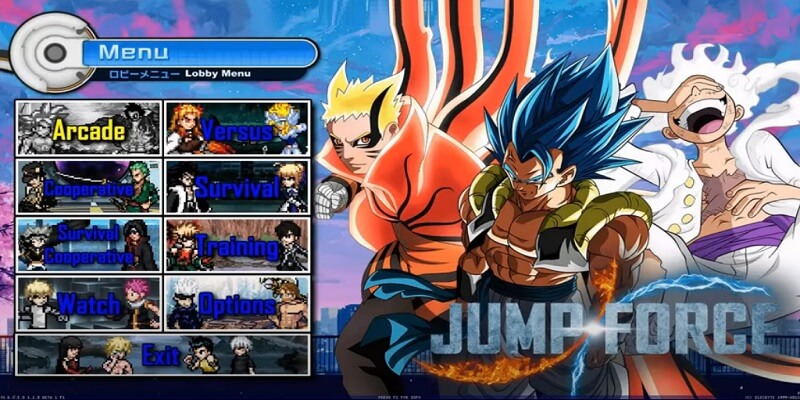
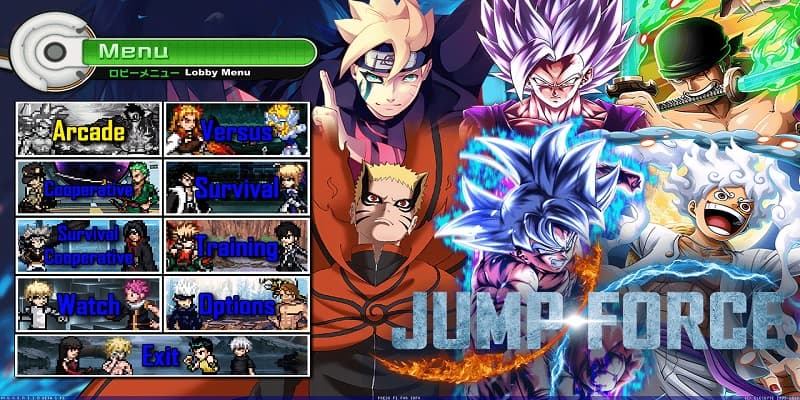
Download Jump Force Mugen V10, a fun fangame developed with the free Mugen 2D video game engine, featuring different game modes such as single player, two-player versus modes, team battles, AI-only battles, customization options, and more.
You can try playing it on other platforms, such as Android phones, with emulators like ExaGear or Winlator. We have tutorials for that on our YouTube channels or right here in the tutorials section of the menu.
Follow us on our social media so you don't miss out on upcoming games, tutorials, updates, and more.
Game Information:
Platform:
PCAuthor:
Dark Night MugenCompressed:
36 GBUnzipped:
60 GBStorage:
96 GBRendermode:
DirectXLinks download:
Links Patch Update:
Instructions:
Playing Instructions:
(Open) If the game has only one part:
- Have WINRAR installed, the free trial works and is downloaded from the official website.
- Then right click on the game file.
- Look in the menu for the WINRAR icon or section and select the "Extract to" or "Extract here" option.
- Wait for the game to finish extracting.
- The folder with the game files will be created.
- Open the folder and run the icon with .exe extension can have the Mugen icon or the name of the game.
(Open) If you have several parts:
- Download all the complete parts and have them together in the same folder, if any part is missing the game may not work.
- Have WINRAR installed, the free trial works and is downloaded from the official website.
- Right click on part number 1 and then look for the WINRAR icon or section in the menu and select the "Extract to" or "Extract here" option.
- It will start extracting that part of the game and usually continue automatically with the other parts until all parts are finished.
- If it does not continue automatically with the other parts, you must extract each part of the game separately and make sure that all the extracted files are saved inside the same folder, if they are extracted in separate folders, you must put them all together inside a single folder
- Open the folder and run the icon with .exe extension may have the Mugen icon or the name of the game.
(Open) If you are going to apply a Patch:
- Download the patch.
- Have WINRAR installed, the free trial works and is downloaded from the official website.
- Right click on the patch file and then look in the menu for the WINRAR icon or section and select the "Extract to" or "Extract here" option.
- Start extracting until finished.
- Then open the folder that was created and copy all the files and folders inside.
- Now you must go to the folder of the game you are going to update and paste inside the files you copied, it will ask you to replace some files you must accept and wait for it to finish.
- When finished you will have the game updated to the new version.
If any message, error or problem arises when extracting the game, maybe the compressed file or if it is of several parts, it did not download correctly, try to download the game again and if it still does not work comment us in this page below or in some of our social networks to verify and try to change the game file and publish it again.
i know this not the latest version uopdate but my pc only compactible with v10 my question is i downloaded everything but for some reason wheni extract only part 1 only 3v3 and 4v4 pop up and when i open those it says the application failed because its side by side configuration is incorrect.
Hello friend, could you tell us what error is happening to you with the latest v12? Just as this works with DIrectX, it should also work for you, and what you are saying may be that some of the parts were not downloaded correctly and that is why files are missing, since it usually happens sometimes, you could try downloading again, Regards
ah…eeeee.eu_quero_paixar_personagens_de_mugen_para_o_jogo.por-isso_que_preciso_da_select…e_eu_nao_sei_como_se_pode_ter_a_pasta_select_se_ela_nao_tem_pra_ir_diretamente_quando_paixar_jogo,sendo_assim…como_tela…-e_paixando_nos_arquisos.
Olá amigo, poderia escrever um pouco mais claro, não falo seu idioma e o tradutor não faz a tradução correta, Atenciosamente
cara,seguinte…todos_os_jump_force_mugen_que_eu_paxei_nao_tem_select_na_pasta_de_data…———porfaor,confiram_se_essa_ersao_tem…(meu_pc_ta_tranado_por_isso_to_escremendo_assim)
Olá amigo, poderia escrever um pouco mais claro, não falo seu idioma e o tradutor não faz a tradução correta, Atenciosamente
what does it mean all the files have to be in one location
Hello friend, all the parts that you download, in the same way we have a tutorial where we show how to download, extract the game and how to start the game here https://juegosdemugen.com/en/download-tutorial Greetings
Hello greaaaaat job <3 but how charge the énergie ??? what key should i press ?
Hello friend, the default key is ENTER to charge energy, remember that you can change it by modifying the controls in the options if you need a tutorial here we have a basic one https://juegosdemugen.com/en/how-to-change-controls-in -mugen applies to all mugen games
how to I select a character and start the match? like I can move around in the roster but i’ve tried all buttons and nothing is happening
Hello friend, you can see and change the configuration of the controls with the help of our tutorial https://juegosdemugen.com/en/how-to-change-controls-in-mugen Regards
Whats a winrar
Anyone knows
hello friend look here https://www.youtube.com/watch?v=vhXQOtGMx28
Salut serais t’il possible de m’indiqué un tuto pour changer les touches mannettes ?
Hello friend look here https://juegosdemugen.com/en/how-to-change-controls-in-mugen
pls someone tell me how to install full game
I think Aizen would be much more fun without health regeneration, like in the older versions.
PS: Can’t wait for v11 :>
How do i play the game i downloaded it already.
Hello friend, extract it with winrar and run it, above are the instructions, Regards
is says error when for gojo when im trying to extract
Hello friend, maybe it did not download correctly, you can try to download it again, Regards
I can play but I’m having some issues when playing Arcade and Survival. It seems like the settings aren’t reflecting as the CPU strength doesn’t change when I adjust. Also it’s hard to progress in these modes because me and the CPU gain our health back pretty much instantly. The only way to win is really a one hit combo. CPU also spams moves but other than that the game is great!
I cant download because of mediafire, i need mega or anything else
Hello friend for now we only have Mediafire, Greetings
Existe alguma forma de jogar 1v1 com seu amigo usando o mesmo computador?
Hola amigo si puedes, solo debes configurar los controles del player 1 y 2 y jugar en Versus, Saludos
Can we play as gear 5 luffy? Can you please explain how if we can? I can’t find any YouTube guides.
Hello friend you can download it and add it to the game, you can download it from here https://juegosdemugen.com/en/mugen-char-luffy-gear-5 and if you need a tutorial to add it to the game we have a basic tutorial here https://juegosdemugen.com/en/how-to-add-characters-in-mugen any questions you can tell us, Greetings
It worked just as you said, thank you!!
Perfect thanks for telling us, Greetings
Hi,
How do I play with gear 5 luffy? I can’t find him In the game and I also can’t find tutorial in YouTube
Hello friend you can download it and add it to the game, you can download it from here https://juegosdemugen.com/en/mugen-char-luffy-gear-5 and if you need a tutorial to add it to the game we have a basic tutorial here https://juegosdemugen.com/en/how-to-add-characters-in-mugen any questions you can tell us, Greetings
ן did it all and it worked, thank you very much!
Perfect thanks for telling us, Greetings
Hi I have a problem. I can’t EXTRACT the game. It says:
The archive is either in unknown formar or damaged
HOW DO I FIX THIS?
Hello friend, did you download all the parts?
where is Cosmic Garou at i cant find him no where
se puede cambiar el idioma?
Hola amigo se puede cambiar el idioma del menu pero modificando los archivos del screenpack del juego, debes buscar un tutorial en youtube ya que no hemos hecho ninguno todavia, Saludos
Is there any torrent link or so. Because downloading 35GB over Chrome is taking years. Even doe I normally have 100+ Mbit wifi. With torrent I can reach 100Mbit with Chrome only 200kbit. How should I download the game?
Hello friend, sorry for now we do not have a torrent, the only option is mediafire for now, Greetings
Hello
I am currently not able to install the game on my pc and I don’t know why. Is it possible that using chrome as the navigator is the problem ?
Hello friend and what problem do you have? does it show you any error?
it stops responding after they show the constructions
Hello friend, if it shows you the black screen, it is the loading screen, it can take several minutes, even up to 5 minutes, for the game to appear, you just have to wait for the game to start, you can also reduce the resolution of the game by one less so it will take less time, Greetings
I didn’t see this at first (Then download all the chapters to the same folder), I downloaded it straight, but when they were all installed, I added a folder and copied part1, part2, part3 and part4, is that why it doesn’t work?
jump force v10 it stays on black screen what should i do i even tried 4gb_patch.zip and it didn’t work
ok ok the problem went away i tried logging in a few times it entered slowly no problem ohhhh i was scared
Hello friend, the black screen is the loading screen, it can take several minutes, even up to 5 minutes, for the game to appear, you just have to wait for the game to start, you can also reduce the resolution of the game by one less so it will take less time, Greetings
What to do if instead of some characters there are just white squares and there are no characters
Hello friend, if you talk about the boxes at the end that are empty as in the gameplay, they are empty slots to add more characters, Greetings
У меня ужасно медленная загрузка 300кб в секунду хотя интернет очень хороший что сделать
while downloading plas help and i am for anther acc
Hello friend, I do not understand the question?
i cant dowload it says ERR_CONNECTION_RESET when donwloading it
Err_connection_reset means that your browser cannot establish a connection to the remote server. In most cases, this is due to a misconfiguration in the Internet settings or something that is blocking the connection.Try to search the internet about this error when downloading, maybe you will get some solution
why the game gone after i pick a character
where to?
DO YOU NEED TO ADD PART 4?
yes friend all parts
bruh it is not working can u please tell come thing it is only showing
ERR_CONNECTION_RESET
pls help me
Hello friend, I understand your problem, does that error appear when you start the game or when downloading?
you guys need to add more rwby/slime and overlord characters it would fill th roster evn more with divers characters. keep up the good work 😀
Hello friend, thank you very much for commenting, but remember that the creator of the game is Dark Night on his YouTube channel, you comment on the recommendations you have and you can thank him too, Greetings
Is there a torrent cause it is easier to download?
Hello friend for now we only have the mediafire link, Greetings
Olá você pode me falar se tem alguma chance de pegar vírus baixando o jogo?
Olá amigo não tem vírus, Saudações
Muito obrigado!
Could you add the anime. Overlord, And add a update for all fate characters. And update Sinbad.
Hello friend, remember that we do not make the games, we only share them, and we mention the authors if we manage to verify them, and in this case you could add more characters yourself, you can download them from Youtube and add them, also in the Tutorials menu there is a basic tutorial yes you need it or you can look for a more advanced tutorial on Youtube, Greetings
Could you guys add overlord characters please.
36 gb, lawd, for the love of zeus, compress the characters are rar files
over all this is 93gb foe me
Yes friend that is the total
why i cant play this game , blankscreen after keyboardcontrol prieview
Hello friend, you must wait for the game to load after showing the keyboard images, in most cases it takes up to 6 minutes, Greetings
In my opinion you should add more chracters (like mikey and draken from tokyo revengers ) and more game mode like me against a specific number of bots that as I level up will increase their number.
or I would add a story against certain bosses.
but i like this game so congratulations
Hello friend, thank you very much for your comment, remember that the credits are for Dark Night, you can go to his YouTube channel and give him recommendations, he is a good person and almost always answers the comments, your ideas are good, also remember that you can add more characters yourself , here on our site we have some to download and also a basic tutorial on how to add the characters if you need it, Greetings
what does it mean by ”Patch to apply if you already have V9”?
And how do I go UI and MUI as Goku? , because YouTube isnt helping me.
Hello friend, the patch is to update the jump force v9 to version 10 and so you don’t download the entire jump force v10, just download the patch and copy the files that are inside the compressed and paste them inside the v9 game folder and you replace the files when I ask you and that’s it, and for the transformation we don’t have a tutorial yet but they appear in the .cmd file inside the character’s folder there it shows you the combinations of all the movements and powers of the character you can help yourself with Youtube if you need, regards
Can you please add these animes ? Vinland saga , Megaloboxing , Afro samurai , and Berserk characters!
LOVE THE GAME BTW GREAT JOB!
Hello friend thanks for commenting, you can add the characters yourself you can download them from youtube looking for the character’s name for Mugen and above in the main menu you have a tutorial on how to do it if you need it or you can search on youtube too, and remember that the Credits are for Dark Night, he is the author of the game, he also has a YouTube channel, you can support him, Greetings
Please , can you add vinland saga , megaloboxing , afro samurai , and berserk characters!
LOVE THE GAME BTW GREAT JOB!
Hello friend thanks for commenting, you can add the characters yourself you can download them from youtube looking for the character’s name for Mugen and above in the main menu you have a tutorial on how to do it if you need it or you can search on youtube too, and remember that the Credits are for Dark Night, he is the author of the game, he also has a YouTube channel, you can support him, Greetings
youtube channel?
Hello friend, our channel is the one with the video that is above the download links, it is also in a button in the menu with the red YouTube symbol and I leave it here too https://www.youtube.com/channel/UCENWnCbO6KFazPJf_jEPueg Regards
when openning the game , after the controls screen my game remains stuck in a black screen , what should i do?
Hello friend the black screen means that the game is loading, the duration depends on the performance of your PC in the same way it usually takes several minutes, sometimes it takes 5 or 6 minutes to load, to reduce the loading time you can reduce the resolution of the game to a lower one and it will take less time to load, Greetings
how to form luffy gear 5??
Hello friend We don’t have the combination of keys, but you can search Youtube and there are always tutorials of the combinations and transformations, Greetings
o link n aparece para eu baixar o jogo
Olá amigo, o link do jogo está no primeiro botão que diz Mediafire acima, Saudações
Pls add torrent
Can u please tell what’s new in jump force v10
Hello friend, it has new characters and scenarios, you can see some of the characters in the gameplay that we published a few minutes ago, Greetings
where joy boy luffy
it crashes when i select certain characters like GHOST FINAL FORM
Hello friend, some characters may have bugs, you can replace yourself by downloading each character again or you can see the Dark Night channel, the author of the game, to see if he publishes any patch to repair errors, Greetings
doesnt start anymore since v10
Hello friend, I do not understand your question?
how do you download this, doesnt work
Above the Mediafire links are the instructions
kakuzu is too op bro
What does it mean by ”patch to apply if you already have v9”?
Hello friend, the patch is to update the jump force v9 to version 10 and so you don’t download the entire jump force v10, just download the patch and copy the files that are inside the compressed and paste them inside the v9 game folder and you replace the files when I ask you and that’s it, Greetings
patch doesn’t work what do i do
Hello friend, did I show you any error? can you explain how you did it to help you
Ok
CAN SOMONE SHOW ME A TOTTURIAL OR HINT HOW TO DOWNLOAD
Hello friend above the download button are the instructions, just follow them carefully, and if you need help in any step do not comment and we will help you, remember that you must download the 4 parts, Greetings
my [backward]+[down]+A,B,C,etc dose not work my other one work normal but like 3 controls together dosenot work only 2 at the same time works
how connect a joystick ? ps4!
Hello friend, it is already in the selectable characters Greetings
It is the last character of the selection but I mean that I think it can be transformed with a combination of keys of course
Hello friend, thanks, for now we do not have the possibility of publishing it in torrent, later if we can, in the meantime we only have the links, Greetings
Hello friend, if you mean the empty slots in the last line, they are to add more characters, Greetings
Hello friend if you can, the important thing is that all the parts are inside the same folder, after that you extract part 1 with winrar and the others are extracted automatically, and remember the loading time detail the game takes a few minutes to open you just have to wait, regards
Hello friend, sorry for the delay in my response, but that error tells you that Goku OP’s character gives an error when loading the game, maybe all the parts were not downloaded correctly or it could also be that it was not extracted correctly with winrar, you can try to extract it again or download the game again, you can also try to delete the Goku OP character so that the game does not take it into account when starting the game for that you must enter the game data folder and edit the file called select .def with the notepad and delete only the line that indicates the name of the Goku OP char and save the file by closing it, then try again to start the game, remember to make a backup copy of the select.def file to have backup for if something goes wrong, and you tell us anything, Greetings
Hello friend if it is sure, Regards
Hello friend, the download button is below the minimum requirements, Regards
In which of the parts do you get that error friend?
Hello friend, it is for Windows, you would have to use an app emulator for Windows on MAC, Regards
Hello friend, I don’t understand what you mean by 59 GB?